
Tasks
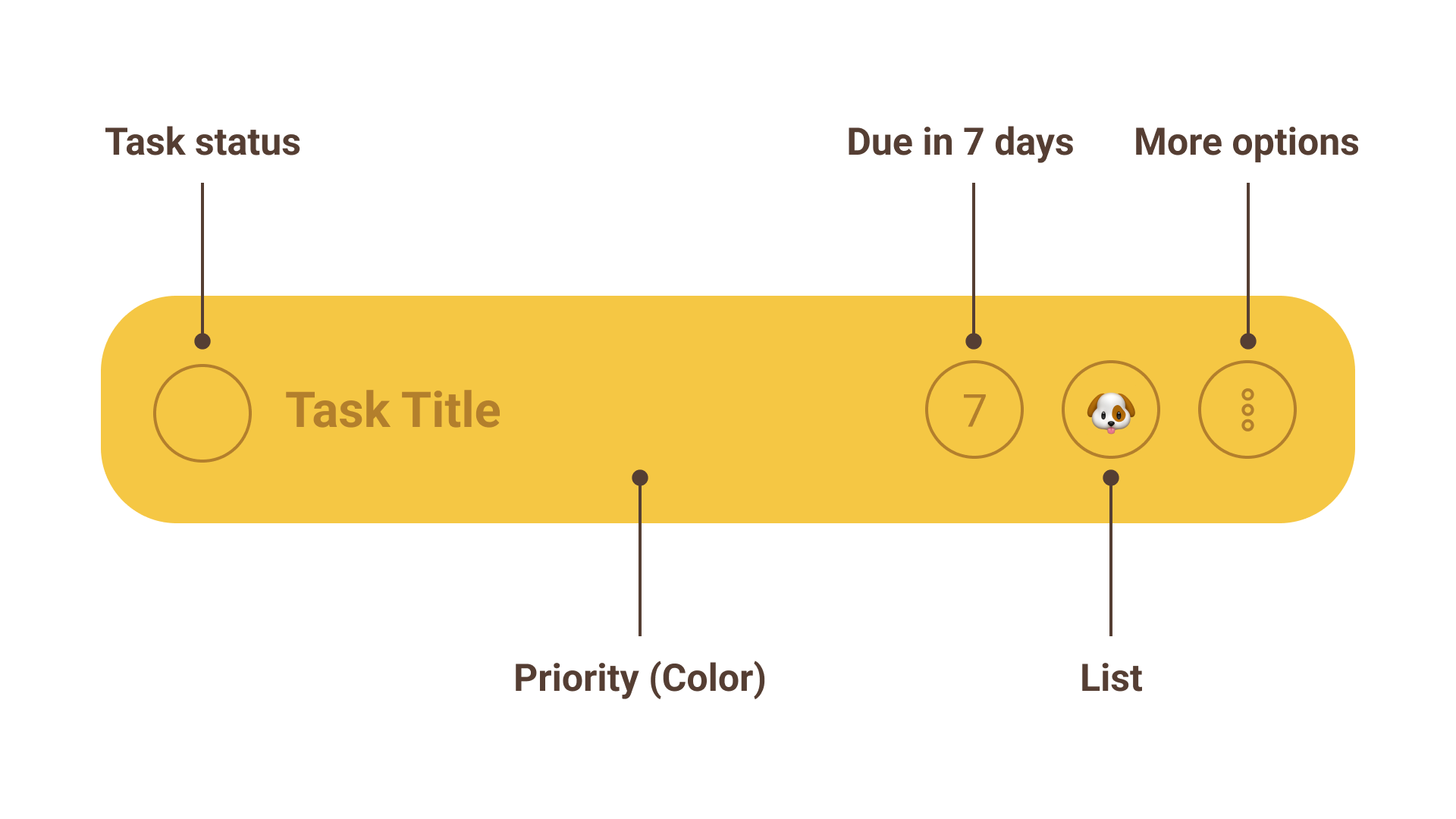
Your tasks live in the Day view. The morning ritual ends by sending you there: once the Backlog step has helped you decide what the day is actually for, the last step hands you straight to that day's list.
The evening ritual gets to the other half of that a breath later: after its opening Breathe step, everything still open on the day you're closing out, with a button on each side of it — send it to tomorrow, or take it off the calendar and back into your backlog. Clear the list and the step says so. It ends on the day you just sent all of that to: whether tomorrow is busier or calmer than a typical one of its weekday, and the events and tasks it holds.
Status
- Todo: Tasks you haven't seriously started
- In Progress: Tasks you have started and need to close out
- Done: Tasks you have completed
- Won't Do: Tasks you decided to close out without completing
- Delegated: Tasks you handed off to someone else
Not everything needs to be completed by you. After planning your day, you may decide that a task is better off handed to someone else, or simply left undone so you can focus on something more important. Won't do and delegated are your super power in the battle against chronic busyness, don't be afraid to use them (wisely)!
Done, won't do, and delegated all close a task out: it drops off your backlog and stops nagging you.
Renaming a task
Tap a task's title to edit it in place. The same works for subtasks. Titles are saved when you tap away or press return, and a title left empty simply reverts — a task without a name would be impossible to find again.
Subtasks
Some tasks are really a short checklist. Rather than cluttering your day with five separate cards, add subtasks and they'll live inside the parent task's card.
- Tap the circle beside a subtask to check it off, and again to uncheck it
- Completing the parent checks off everything under it, so you don't have to tick each one on your way out
- Tap the
⋯beside a subtask to delete it, or promote it to a task if it turns out to be bigger than a checklist item — the new task keeps the parent's list, priority, and dates, and arrives done if you'd already checked it off, or to do if you hadn't - Repeating tasks carry their checklist too, so each new occurrence starts fresh
Subtasks are deliberately lightweight: a title and a checkbox, nothing more. They have no statuses of their own — no in progress, no won't do — and no subtasks, due dates, or alarms. If a subtask needs any of that, it wants to be a real task — promote it.
Priority
Because priority is such an important part of the Dexter Method the main styling of task cards is derived from their priority.
Due date vs do date
Dexter has two different types of dates: a due date, and the date a task is scheduled to be worked on (do date). Here's how they differ and why they are distinct.
- Due Date: US Taxes are Due April 15th
- Do Date: I might start my taxes in February once I have all my forms
In this scenario we can have one task due April 15th and start working on it sooner.
In the Dexter Day Planner, once you add a Due Date it will start ticking down the number of days you have left to complete the task. This can be very helpful when planning work thats further out and might sneak up on you.
Lists
Lists are a simple, visual way to organize tasks any way you see fit.
Make a list for work, a list for chores, a list for hobbies, a list for projects - whatever makes sense in your brain.
Each list is represented by an emoji you choose to keep it kind of cute.
Note: Tasks can only be assigned to one list.
On a larger screen, the Lists tab shows a board with a column per list, so you can drag tasks between them.
More options
The more options menu is a catch all for buttons that didn't fit on the card. After all, there's only so much space.
- Edit task: Open the whole task in a form — title, priority, list, schedule, deadline, alarm, and checklist, all in one place
- Priority: Assign a priority to the task (changes the card color)
- Schedule: Pick a day to work on the task (see "due date vs do date" above)
- Add subtask: Start a checklist inside the task (see "subtasks" above)
- Duplicate: Make an independent copy of the task
- Repeat: Schedule repeating tasks - daily, weekly, monthly, or annually
- Save as template: Keep the task as a reusable starting point (see "templates" below)
- Delete: Permanently deletes the task and all data associated with it
The menu keeps the changes that take a single tap. Anything that needs a picker — the list, the deadline, an alarm, or a day that isn't one of the presets — lives in Edit task, which is the same form you get when you create a task. Schedule still offers Today, Tomorrow, and Next Week directly; choosing "Pick a date…" opens the form.
Once a task came from a template - because you repeated it, saved it, or created it from the Template tab - those two entries are replaced by a single Edit repeat schedule or Edit template, which opens the one it belongs to. To turn a template into a repeat (or stop one repeating), open Settings → Tasks and change its Repeats setting.
Templates
Some tasks come back without being on a schedule. Packing for a trip, onboarding a new hire, the checklist you run before every release — you want the same starting point, just not every Tuesday.
Save one from any task's ⋯ menu with Save as template. The template keeps
the title, priority, list, and checklist, but no dates — the original task
carries on unchanged.
To use one, tap + to create a task and switch to the Template tab. Pick a template and the form fills in, still fully editable, so you can adjust anything before saving. The new task lands on the day you were viewing.
Templates live in Settings → Tasks, next to your repeat schedules — they're really the same thing wearing different hats. If a repeating task turns out not to need a schedule after all, open it and set Repeats to Never: it keeps everything else and moves over to your templates.